How to Book the Flight Deals in Your Inbox

Booking a deal takes less than two minutes. Follow these simple steps to lock in your cheap flights before the prices jump back up:

1. Click Any Deal Link

Tap any underlined flight route in your alert email to launch the live search in Google Flights.

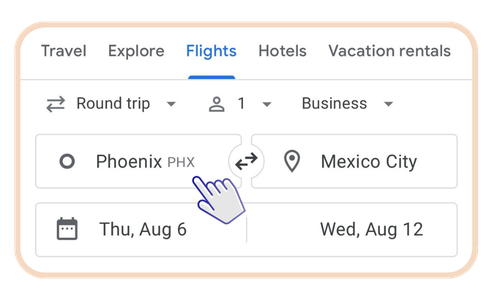
2. Adjust Your Departure Airport

Don’t see your specific airport? No problem! Click any deal link in the email, then swap the origin city at the top of Google Flights to your preferred local airport (e.g., CLT, RDU, CHS, GSP). The discount will often still apply!

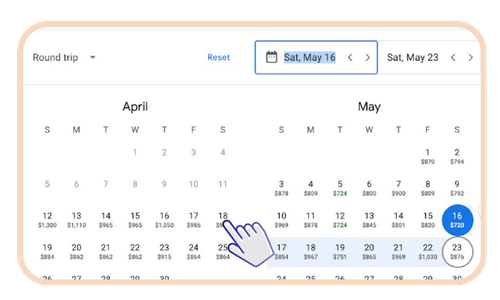
3. Choose Your Travel Dates

Use the Google Flights calendar view to browse open dates.

  • Price Calendar Bug: Sometimes the super-low deal price doesn’t show up directly on the calendar grid—that’s totally normal. Select your desired dates anyway and let the full search run; the discounted price will appear on the final results page.
  • Flexibility Tip: Shifting your trip by just 1 or 2 days can make a massive difference in price.

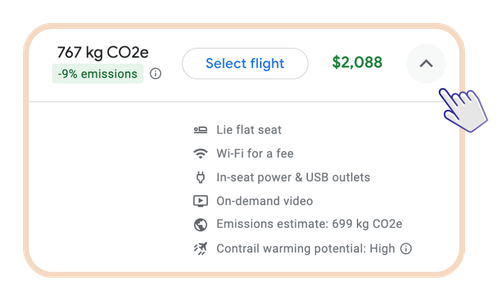
4. Check Your Seat & Cabin Details

Click the small dropdown arrow on your chosen flight to review the seat type and flight details like layovers.

5. Book Your Seats

Click the link in Google Flights to go directly to the airline website to book. Some deals only work through online travel agencies like Expedia. However, sometimes the flight is available directly on the airline, but the sale price won’t show on Google Flights. Use Google Flights to find the dates you want to book, then go search directly on the airline’s website to see if it’s available.

⚡ Pro-Tip: Glitch fares and mistake prices usually last less than 24 hours. If you see a deal you love, book it immediately—For flights departing the USA, you have a free 24-hour cancellation window if you need to double-check your schedules!


Join for Free